Bathroom design with AI
Upload a photo of your current bathroom, pick a style, and in about half a minute you see the same room renovated. Windows, doors and the position of the tub, shower and toilet stay where they are; what changes is the tiling, the fixtures, the floor and the light. That answers the question most people start with: will large light tiles make this room feel bigger, or just colder? It is a mood impression, not an architectural drawing.
Loading the impression tool…
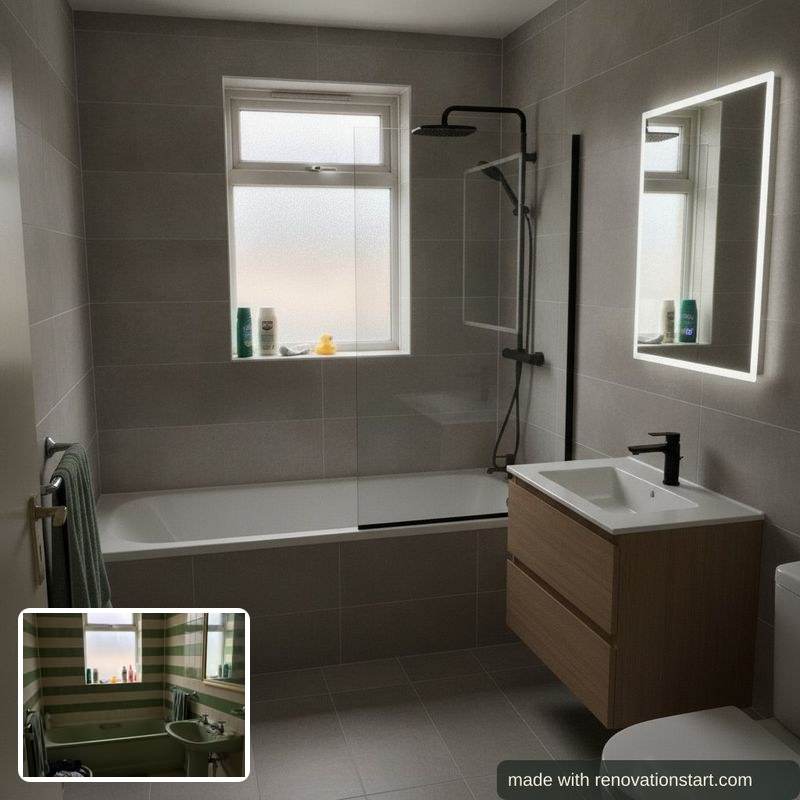
Honest about what this is: a mood impression that shows a direction, not an architectural drawing and not a quote. If you want measurements, use the bathroom planner; its layout travels along into the impression.
What to do next
- Draw your bathroom to scale: clearances, door swings and plumbing costs, and your layout travels into the impression.
- See what a bathroom costs: honest UK ranges, with the assumptions written out.
- Check the quotes when they arrive: line by line against independent reference prices.
Also for the kitchen, the bedroom and the loft.
How the bathroom design AI works
An AI impression of your own room after the renovation: upload a photo, pick a style, and the chain keeps the room intact (windows, doors and fixtures stay in place) while rendering the new finish.
- Upload a photo of your room; it is stripped of location data, processed once and never used for training.
- Pick a style.
- Get the impression with watermark within about half a minute.
- Optionally place a product photo from a shop into the result to see it in your own room.
- What you enter:
- A photo of your room and a style choice; optionally a product photo.
- What you get:
- A watermarked AI impression of your renovated room; a monthly number of impressions is free, no account needed.
Frequently asked questions
Can AI show what my bathroom would look like renovated?
Yes. The model works from your own photo, so with your window, your light and your proportions, and is instructed to keep the layout as it is: windows, doors, tub, shower and toilet stay in place while the finish is renewed. That works well but not perfectly; small details can shift. Use it to choose a direction, not to instruct a builder.
Can I change the layout too?
Not on this page, and that is deliberate: moving a toilet or shower is a plumbing job with real costs, not a finish choice. If you want to try a different layout, draw it in the bathroom planner first; it checks clearances and door swings, prices the plumbing moves, and its layout travels along as placement hints when you generate an impression from there.
Can I put my own tub or tiles in the picture?
Yes. Under a generated impression you can upload a photo of a product you found online, a bathtub, a shower, wall or floor tiles, a vanity unit or a tap, and have that one thing replaced. Copy the product photo in your shopping tab and paste it straight in. Large items come through well; fine details like a handle will not be exact.
Is this 3D?
No. It is a photo impression based on your own photo, not a 3D model you can rotate and not an architectural rendering. If you want a floor plan with real measurements, use the bathroom planner; it draws to scale in 2D.
Can I not just do this myself with ChatGPT or Gemini?
You can, and sometimes that is fine. The difference sits in four things. One: this chain forces your room to stay intact; windows, doors and fixtures keep their place, where a bare AI model tends to redesign the space (in our own measurement the toilet consistently disappeared). Two: the image is tied to your numbers; the impression renders in the finish level of your calculation and takes your drawn layout along, so what you see belongs to what it costs.
Three: your own tub, tile or cabinet front lands in the image reliably while the rest of the room stays put; try that in a chatbot and the room changes with it. Four: your photo is stripped of location data, processed once and never used for training; with a consumer chatbot that depends on your settings. If you just want a quick mood image that belongs to nothing, a chatbot is a fine tool.
What does it cost?
One impression credit per image, and 4 a month are free, without an account or an email address. Every image costs real money with the AI provider, which is why they are not unlimited. Need more? 10 images cost £4.95, or take the Renovation Pack (£19.95, one-off): 25 images and 5 AI quote checks for your whole project, no expiry, on your free account. Everything that is knowledge stays free.
What happens to my photo?
It is sent encrypted to the image model, processed once in memory and discarded straight after. Neither the photo nor the result is stored on a server. Location data that phone photos can contain is stripped before the photo leaves the server. Please do not upload photos with people in them; those are refused.
Do I need an account?
No. Everything on this site works without an account and without an email address, and this page is no exception.